【spring 国际化】springMVC、springboot国际化处理详解
- 4/19/2020

在 web 开发中我们常常会遇到国际化语言处理问题,那么如何来做到国际化呢?
你能 get 的知识点?
- 使用 springgmvc 与 thymeleaf 进行国际化处理。
- 使用 springgmvc 与 jsp 进行国际化处理。
- 使用 springboot 与 thymeleaf 进行国际化处理。
你必须要知道的概念
关于 i18n:
i18n(其来源是英文单词 internationalization 的首末字符 i 和 n,18 为中间的字符数)是“国际化”的简称。在资讯领域,国际化(i18n)指让产品(出版物,软件,硬件等)无需做大的改变就能够适应不同的语言和地区的需要。对程序来说,在不修改内部代码的情况下,能根据不同语言及地区显示相应的界面。 在全球化的时代,国际化尤为重要,因为产品的潜在用户可能来自世界的各个角落。通常与 i18n 相关的还有 L10n(“本地化”的简称)。
一:使用 springgmvc 与 thymeleaf 进行国际化处理。
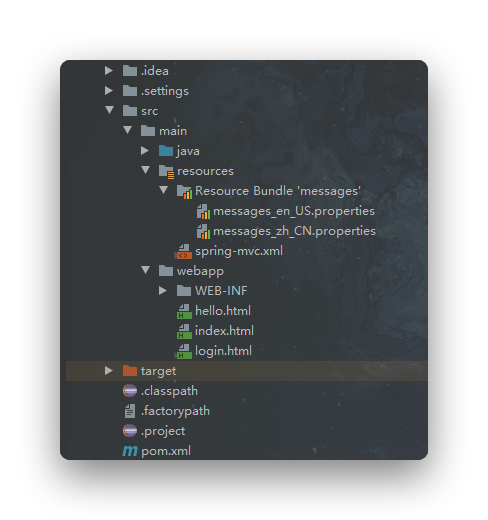 1、在项目 spring 的 Spring MVC 配置文件 springmvc.xml 中,你需要配置
- 资源文件绑定器 ResourceBundleMessageSource
- SessionLocaleResolver(用于将 Locale 对象存储于 Session 中供后续使用)
- LocaleChangeInterceptor(用于获取请求中的 locale 信息,将其转为 Locale 对象,获取 LocaleResolver 对象)。
    <!--   使用ResourceBundleMessageSource实现国际化资源-->
    <bean id="messageSource" class="org.springframework.context.support.ResourceBundleMessageSource">
        <property name="basenames" value="messages"/>
        <property name="defaultEncoding" value="UTF-8"/>
    </bean>
    <bean id="localeResolver" class="org.springframework.web.servlet.i18n.SessionLocaleResolver">
        <property name="defaultLocale" value="en_US"/>
    </bean>
    <mvc:interceptors>
        <bean class="org.springframework.web.servlet.i18n.LocaleChangeInterceptor">
            <property name="paramName" value="lang"/>
        </bean>
    </mvc:interceptors>
2、在控制器中添加方法 localeChange 处理国际化,并注入 ResourceBundleMessageSource 的 Bean 实例
    @Autowired
    private ResourceBundleMessageSource messageSource;

    @GetMapping("/localeChange")
    public String localeChange(Locale locale){
        String userName = messageSource.getMessage("userName",null,locale);
        String passWord = messageSource.getMessage("passWord",null,locale);
        System.out.println(userName+passWord);
        return "login";
    }
3、创建国际化资源属性文件messages_en_US.properties和messages_zh_CN.properties。
注意这两个文件的命名格式,否则解析会出错,
并且我这里的两个文件就是位于我的 resources 目录下,当你新建这两个文件后,他会自动给你归档,不要以为我的这两个上面还有一层,你也跟着建一个文件夹。
1、messages_en_US.properties
userName=userName
passWord=password

2、messages_zh_CN.properties
userName=用户名
passWord=密码
4、新建 html,用于最终的显示,这里使用的是 thymeleaf 模板引擎,没有做 springmvc 与 thymeleaf 的整合可以看我的另一篇文章 springmvc 与 thymeleaf 的整合 🔗
<!--
  @Author: lomtom
  @Date: 2020/4/19
  @Time: 16:51
  @Email: lomtom@lomtom.cn
  -->

<!DOCTYPE html>
<html lang="en" xmlns:th="http://www.thymeleaf.org">
  <head>
    <meta charset="UTF-8" />
    <title>login</title>
  </head>
  <body>
    <h2 th:text="#{userName}+' '+#{passWord}"></h2>
    <a href="localeChange?lang=en_US">英文</a>
    <a href="localeChange?lang=zh_CN">中文</a>
  </body>
</html>
最终的效果:

二: 使用 springgmvc 与 jsp 进行国际化处理。
这里的前三部与上面相同,唯一有区别的就是最终视图的显示,使用 jsp,就要用到 JSTL 标签,这里需要引入 JSTL 的 message 标签。
即在头部加入<%@ taglib prefix="spring" uri="http://www.springframework.org/tags" %>
然后通过<spring:message>元素的 key 属性输出资源属性文件中的 key 所对应的值,最终的 jsp 是这样的。
<%@ page contentType="text/html;charset=UTF-8" language="java" %>
<%@ taglib prefix="spring" uri="http://www.springframework.org/tags" %>
<html>
<head>
    <title>login</title>
</head>
<body>
    <p><spring:message code="userName"/></p>
    <p><spring:message code="password"/></p>
    <a href="localeChange?lang=en_US">英文</a>
    <a href="localeChange?lang=zh_US">中文</a>
</body>
</html>
依次点击“中文”和“英文”链接,可以看到<spring:message>元素显示的文本能够根据所传递的语言来动态展现。
三:使用 springboot 与 thymeleaf 进行国际化处理。
没有做 springmvc 与 thymeleaf 的整合可以看我的另一篇文章 springmvc 与 thymeleaf 的整合 🔗
1、创建配置文件,抽取页面要显示的消息
 2、springboot 已经配置好了组件,加入即可
spring:
  #    让springboot来管理配置文件
  messages:
    basename: i18n.login
3、让页面获取即可(默认根据浏览器语言来切换),利用thymeleaf
<button type="submit" class="btn btn-default" th:text="#{login.btn}">
  Sign in
</button>
4、根据链接来进行语言的切换 原理:国际化 locale(区域信息对象),如果自定义了,就是用自己的,而不是系统的
<a class="btn btn-sm" th:href="@{/index.html(l=zh_CN)}">[[#{login.zh}]]</a>
<a class="btn btn-sm" th:href="@{/index.html(l=en_US)}">[[#{login.en}]]</a>
<a class="btn btn-sm" th:href="@{/index.html(l=kor_KR)}">[[#{login.kor}]]</a>
5、解析器,因为我们设置了自己的区域信息对象,所以我们需要书写自己的解析器。并且注入到容器中。
1、新建一个LocaleResolver
public class MyLocaleResolver implements LocaleResolver {
    @Override
    //解析区域信息
    public Locale resolveLocale(HttpServletRequest httpServletRequest) {
        String l = httpServletRequest.getParameter("l");
        Locale locale = Locale.getDefault();
        if(!StringUtils.isEmpty(l)){
            String[] split = l.split("_");
            locale = new Locale(split[0],split[1]);
        }
        return locale;
    }

    @Override
    public void setLocale(HttpServletRequest httpServletRequest, HttpServletResponse httpServletResponse, Locale locale) {

    }
}


2、在config文件中加入到容器中
@Configuration
public class MyMvcConfig implements WebMvcConfigurer {
	@Bean
	public LocaleResolver localeResolver(){
	    return new MyLocaleResolver();
	}
}
这个写的时间过于久远,所以贴出代码,感兴趣的,可以自己研究研究:
 1、html
<!DOCTYPE html>
<html lang="ch" xmlns:th="http://www.thymeleaf.org">
  <head>
    <meta charset="UTF-8" />
    <title>[[#{login.title}]]</title>
    <link
      rel="stylesheet"
      href="/webjars/bootstrap/4.4.1/css/bootstrap.css"
      th:href="@{/webjars/bootstrap/4.4.1/css/bootstrap.css}"
    />
    <script
      src="/webjars/jquery/3.3.1/jquery.js"
      th:src="@{/webjars/jquery/3.3.1/jquery.js}"
    ></script>
    <script
      src="/webjars/bootstrap/4.4.1/js/bootstrap.js"
      th:src="@{/webjars/bootstrap/4.4.1/js/bootstrap.js}"
    ></script>
  </head>
  <body>
    <div class="container">
      <div class="clearfix row">
        <div class="col-md-12 column">
          <form
            class="form-horizontal"
            role="form"
            th:action="@{/user/login}"
            method="post"
          >
            <div class="form-group  text-center">
              <h1 class="h3 font-weight-normal mb-3" th:text="#{login.tip}">
                Please sign in
              </h1>
              <p
                style="color: red"
                th:text="${msg}"
                th:if="${not #strings.isEmpty(msg)}"
              ></p>
            </div>
            <div class="form-group">
              <label
                for="username"
                class="col-sm-2 control-label"
                th:text="#{login.username}"
                >Username</label
              >
              <div class="col-sm-10">
                <input
                  type="text"
                  class="form-control"
                  name="username"
                  id="username"
                />
              </div>
            </div>
            <div class="form-group">
              <label
                for="password"
                class="col-sm-2 control-label"
                th:text="#{login.password}"
                >Password</label
              >
              <div class="col-sm-10">
                <input
                  type="password"
                  class="form-control"
                  name="password"
                  id="password"
                />
              </div>
            </div>
            <div class="form-group">
              <div class="col-sm-offset-2 col-sm-10">
                <div class="checkbox">
                  <label><input type="checkbox" />[[#{login.remember}]]</label>
                </div>
              </div>
            </div>
            <div class="form-group">
              <div class="col-sm-offset-2 col-sm-10">
                <button
                  type="submit"
                  class="btn btn-default"
                  th:text="#{login.btn}"
                >
                  Sign in
                </button>
              </div>
            </div>
            <div class="form-group  text-center">
              <p class="text-muted mb-3 mt-5">@ 2019</p>
              <a class="btn btn-sm" th:href="@{/index.html(l=zh_CN)}"
                >[[#{login.zh}]]</a
              >
              <a class="btn btn-sm" th:href="@{/index.html(l=en_US)}"
                >[[#{login.en}]]</a
              >
              <a class="btn btn-sm" th:href="@{/index.html(l=kor_KR)}"
                >[[#{login.kor}]]</a
              >
            </div>
          </form>
        </div>
      </div>
    </div>
  </body>
</html>
2、properties
1、默认
login.btn=登录
login.en=英文
login.kor=韩文
login.password=密码
login.remember=记住我
login.tip=请登录
login.title=登录
login.username=用户名
login.zh=中文

2、英文
login.btn=Sign in
login.en=English
login.kor=Korean
login.password=Password
login.remember=Remember me
login.tip=Please sign in
login.title=Login
login.username=Username
login.zh=Chinese

3、韩文
login.btn=로그인
login.en=영어
login.kor=한글
login.password=암호
login.remember=저를 기억하세요
login.tip=로그인하십시오.
login.title=로그인
login.username=사용자 이름
login.zh=중국어

4、中文
login.btn=登录
login.en=英文
login.kor=韩文
login.password=密码
login.remember=记住我
login.tip=请登录
login.title=登录
login.username=用户名
login.zh=中文
3、java
1、LocaleResolver
/**
 * 可以在连接上携带区域信息
 */

public class MyLocaleResolver implements LocaleResolver {
    @Override
    //解析区域信息
    public Locale resolveLocale(HttpServletRequest httpServletRequest) {
        String l = httpServletRequest.getParameter("l");
        Locale locale = Locale.getDefault();
        if(!StringUtils.isEmpty(l)){
            String[] split = l.split("_");
            locale = new Locale(split[0],split[1]);
        }
        return locale;
    }

    @Override
    public void setLocale(HttpServletRequest httpServletRequest, HttpServletResponse httpServletResponse, Locale locale) {

    }
}

2、config
@Configuration
public class MyMvcConfig implements WebMvcConfigurer {
	@Bean
	public LocaleResolver localeResolver(){
	    return new MyLocaleResolver();
	}
}
4、yml
spring:
  #    让springboot来管理配置文件
  messages:
    basename: i18n.login
问题
描述:显示中文时乱码
解决:将国际化资源属性文件的编码格式设置为 UTF-8 即可,当然也可以把整个项目编码格式都设为 UTF-8

本文为原创内容,欢迎分享与引用,请保留作者与原文链接。
【spring 国际化】springMVC、springboot国际化处理详解
lomtom
原创发布